
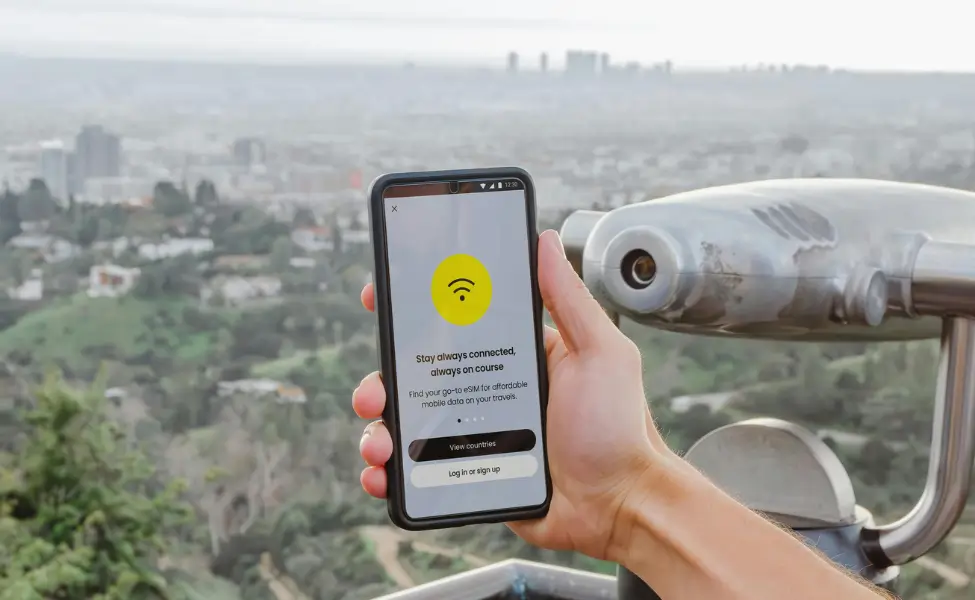
Wondering about the best eSIM for Japan travel?
Landing in Japan without data can make even simple tasks stressful.
An eSIM solves this instantly and often for less money than a pocket WiFi.
An eSIM provides a convenient and affordable way to stay connected without roaming charges.
This guide shows you how to choose the best eSIM in Japan, set it up, and use it with ease during your trip.
As a long-term resident of Japan, I have found that a reliable data connection is essential for navigating the country, from using translation apps in restaurants to checking train schedules on the go.
While Pocket WiFi and physical SIMs work, eSIMs stand out.
I have consistently found that using an eSIM offers the best combination of convenience, cost, and performance.
In particular, I recommend Ubigi for its excellent coverage and straightforward plans.
What is an eSIM in Japan?
An eSIM is a digital SIM card that is embedded in your phone, eliminating the need for a physical card.

Activation is simple.
You scan a QR code, and the eSIM is downloaded to your device.
You can also buy an eSIM through a mobile app, which adds it directly to your phone before your trip.
This allows you to connect to local Japanese networks like NTT Docomo, KDDI, and SoftBank, giving you access to fast and reliable 4G and 5G data.
Why Choose an eSIM for Japan?
•Instant Connectivity: Activate before travel, connect as soon as you land.
•Keep Your Number: Use data on your eSIM while your home SIM stays active.
•Save Money: Avoid expensive roaming fees with local data.
•Simple Setup: Skip airport queues for SIM cards or WiFi rentals.

Choosing the Best eSIM for Japan
When selecting an eSIM provider, travellers often search for the best eSIM in Japan for short stays or long visits.
Consider the following:
•Network Coverage: NTT Docomo offers the most extensive coverage, especially in rural areas.
For most travellers, however, any of the three major networks will provide excellent service in urban centres.
•Data Allowance: Choose a plan that matches your needs.
Light users may find a 1-3 GB plan sufficient, while heavy users should consider an unlimited plan.
Be aware that some “unlimited” plans have fair usage policies that may slow down your data speed after a certain daily limit.
•Validity Period: Select a plan that covers the duration of your trip to avoid paying for unused days.
Best eSIM for Japan: Ubigi
For its reliability and excellent coverage, I recommend Ubigi.
It operates on the NTT Docomo network, which is Japan’s largest and most reliable, making it an excellent choice for travellers exploring both cities and rural areas.
I’ve used Ubigi across Tokyo, Kyoto, and rural Gifu and coverage has been consistently strong, even in the countryside.
Ubigi offers a range of data plans, from daily passes to larger monthly packages, providing flexibility for any trip length.
Their activation process is straightforward, and I have always found their service to be reliable.
While other providers like Airalo and Holafly are popular, Ubigi often provides a superior experience due to its direct access to the NTT Docomo network.
Here’s a quick comparison of popular eSIM providers for Japan:
| Provider | Network | Data Plans | Key Benefit/Drawback | Price Range (approx.) |
| Ubigi | NTT Docomo (Direct) | Various (1GB-Unlimited) | Best coverage, consistent speeds | ¥900 – ¥5,400+ |
| Airalo | KDDI/SoftBank (MVNO) | Fixed (1GB-20GB) | Good for short trips, budget-friendly | ¥720 – ¥4,500 |
| Holafly | KDDI (MVNO) | Unlimited (Daily Caps) | Unlimited data, but can be slower | ¥1,080 – ¥7,200+ |
*Prices are approximate and can vary based on data allowance and validity period.
Setting Up and Using Your eSIM
Check if your phone is unlocked and supports eSIM.
Most iPhones from XS onwards, recent Samsung Galaxy models, and Google Pixel devices are compatible.
Purchase your eSIM online from your chosen provider before your trip.
Using the Ubigi App: Step by Step for First Timers
Download the Ubigi app from the App Store or Google Play before your trip.
Open the app and create an account with your email.

Select a Japan data plan that fits the length of your stay and your usage.
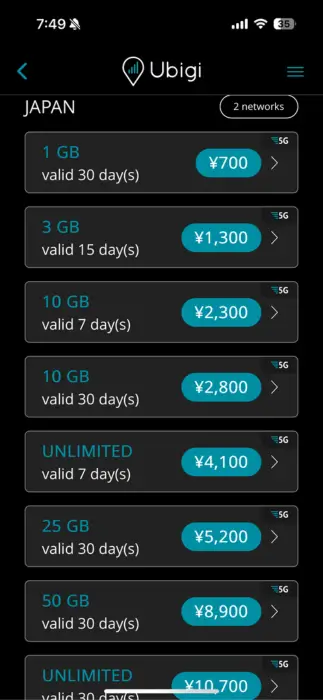
Complete the purchase and receive a QR code for your eSIM.

Go to your phone settings, choose Add Cellular Plan, and scan the QR code.

Once installed, open the Ubigi app to confirm your data balance and manage top ups.
Pro tip: Set up the app and buy your plan before flying so you can connect as soon as you land.
Activating Your eSIM on iPhone
Once in Japan, your phone will connect to the local network automatically.
Go to Settings on your iPhone.
Tap Cellular or Mobile Data.
Select Add Cellular Plan.
Use your camera to scan the QR code provided by your eSIM provider.
When the plan appears on your screen, tap Add Cellular Plan.
If asked, choose a label for the plan such as “Travel” or “Japan”.
In Cellular Data, select your eSIM as the active data line.
Turn on Data Roaming for the eSIM.
Tips for a Smooth Experience
•Data-Only Service: Most tourist eSIMs are data-only. Use apps like WhatsApp or LINE for calls and messages.
•Hotspot Sharing: If you are travelling in a group, you can often share your eSIM connection via a mobile hotspot. Check with your provider to ensure this is supported.
•Battery Life: Using your phone as a hotspot can drain the battery quickly, so carry a portable charger.
•Airport vs Online: Buying an eSIM online before arrival is almost always cheaper and saves time compared to airport counters.
If you want reliable data from the moment you land, get your eSIM before you travel.
It’s faster, cheaper, and keeps you connected whether you’re in Tokyo’s busiest crossings or a quiet countryside village.
Troubleshooting and Practical Considerations
If your eSIM is not connecting after activation:
- Restart your phone. This often resolves initial connection issues.
- Toggle Airplane Mode. Turn it on for about 10 seconds, then turn it off to refresh the network.
- Check network selection. Go to Settings > Cellular or Mobile Data > [Your eSIM line] > Network Selection. Make sure “Automatic” is turned on.
- Verify activation. Confirm the eSIM shows as “Active” in your cellular settings.
Most issues resolve within 10 to 15 minutes of landing.
Customer Support and Data Monitoring
Major providers like Ubigi offer 24/7 English support through their apps.
To avoid going over your allowance, use your phone’s built-in data monitor and check your provider’s app to track usage in real time.
Frequently Asked Questions about eSIMs in Japan
Q: What is an eSIM and how does it work in Japan?
A: An eSIM is a digital SIM card embedded in your phone.
In Japan, you activate it by scanning a QR code, allowing you to connect to local networks like NTT Docomo, KDDI, and SoftBank for 4G and 5G data.
Q: Can I keep my home phone number with an eSIM in Japan?
A: Yes, most tourist eSIMs are data-only, allowing you to use your eSIM for internet while keeping your original physical SIM active for calls and texts on your home number.
Q: Is Ubigi the best eSIM for Japan?
A: Based on extensive personal experience and its direct connection to NTT Docomo (Japan’s largest and most reliable network), Ubigi is highly recommended for its consistent coverage and high speeds, especially in rural areas.
Q: Can I use my eSIM for hotspot sharing in Japan?
A: Most Japan eSIM providers support hotspot sharing, allowing you to connect multiple devices.
However, it’s always best to check the specific provider’s terms and conditions.
Q: Should I buy my eSIM before I travel or at the airport?
A: Buying your eSIM online before your trip is almost always cheaper and more convenient.
You can activate it by scanning a QR code, ensuring you have data as soon as you land, without needing to find a vendor at the airport.
